Landing page
 E-commerce website
 UX/UI design
 Business software & ERP
 SaaS software
 B2B client portal
 Web App & PWA
 Mobile app
 Artificial Intelligence
 Organic SEO
 AI SEO & GEO

Introduction
Your website isn’t attracting visitors? Your website attracts visitors, but they don’t become customers? You’re wondering why your website isn’t converting despite looking good? Web optimisation, SEO, and user experience are key elements to turn your traffic into conversions.
Today, a website built with WordPress, Shopify, Wix or PrestaShop that is poorly optimised or lacking local SEO can go unnoticed on Google, Bing and other search engines, while a poor strategy on Google My Business and social media limits your online visibility. Moreover, AI SEO is revolutionising the way websites appear in search results.
Understanding Conversion Rate and Website SEO Optimisation
1- Definition of Conversion Rate and Its Impact on a Website
The conversion rate is the percentage of visitors who complete a desired action on your website: purchase, contact request, newsletter sign-up, etc. A website can have high traffic but a low conversion rate, which indicates an optimisation problem.
👉 Concrete example: an e-commerce site with 10,000 monthly visitors and only 50 sales has a conversion rate of 0.5%. The goal is to improve this ratio through better user experience (UX) and SEO optimisation.
2- Why Are SEO and User Experience Essential to Improve Conversion Rate?
- SEO and UX are linked: A slow, poorly structured or hard-to-navigate site loses users before they even have a chance to convert.
- SEO improves positioning, but if your content doesn’t meet visitors’ expectations, they leave your site without taking action.
- Google My Business and local SEO play a key role in attracting qualified traffic, meaning users who are genuinely interested in your services.
Tip: use Google Search Console to track your website’s performance.
Why Isn’t Your Website Converting? Common Mistakes and How to Avoid Them
1- User Experience and SEO: An Essential Combination for Conversion
An outdated design, confusing navigation and a slow loading time directly harm conversions.
🚀 Solutions:
- Improve loading speed with high-performance hosting and optimised images. You can use PageSpeed Insights to check your site’s loading speed.
- Have a responsive website to ensure smooth mobile navigation, this is essential! Search engines look at your mobile version before even checking the desktop version, and 98% of visitors are on mobile.
- Make key information easily accessible (visible CTAs, simple forms, structured pages). Add calls to action, don’t let your visitors get lost.
2- Content and SEO: Are Your Visitors Finding What They’re Looking For?
When visitors arrive on your website, they must immediately find the answer to their question. Poorly structured content, a vague message or a lack of clarity pushes them to leave your site without interacting. Result? A high bounce rate, a drop in conversion rate and a negative impact on your SEO.
Your visitors must understand within seconds what you offer
Within seconds, a user decides whether to stay or leave. To prevent them from leaving your website too quickly, it’s essential that:
✅ Your value proposition is immediately visible and understandable, at the top of your content.
✅ Your homepage and service pages directly address visitors’ needs.
✅ Your calls to action (CTAs) are clear and visible as soon as the page loads.
Concrete example: A user searches for “WordPress web agency“. If your site doesn’t clearly mention that you offer WordPress SEO services, they’ll look elsewhere.
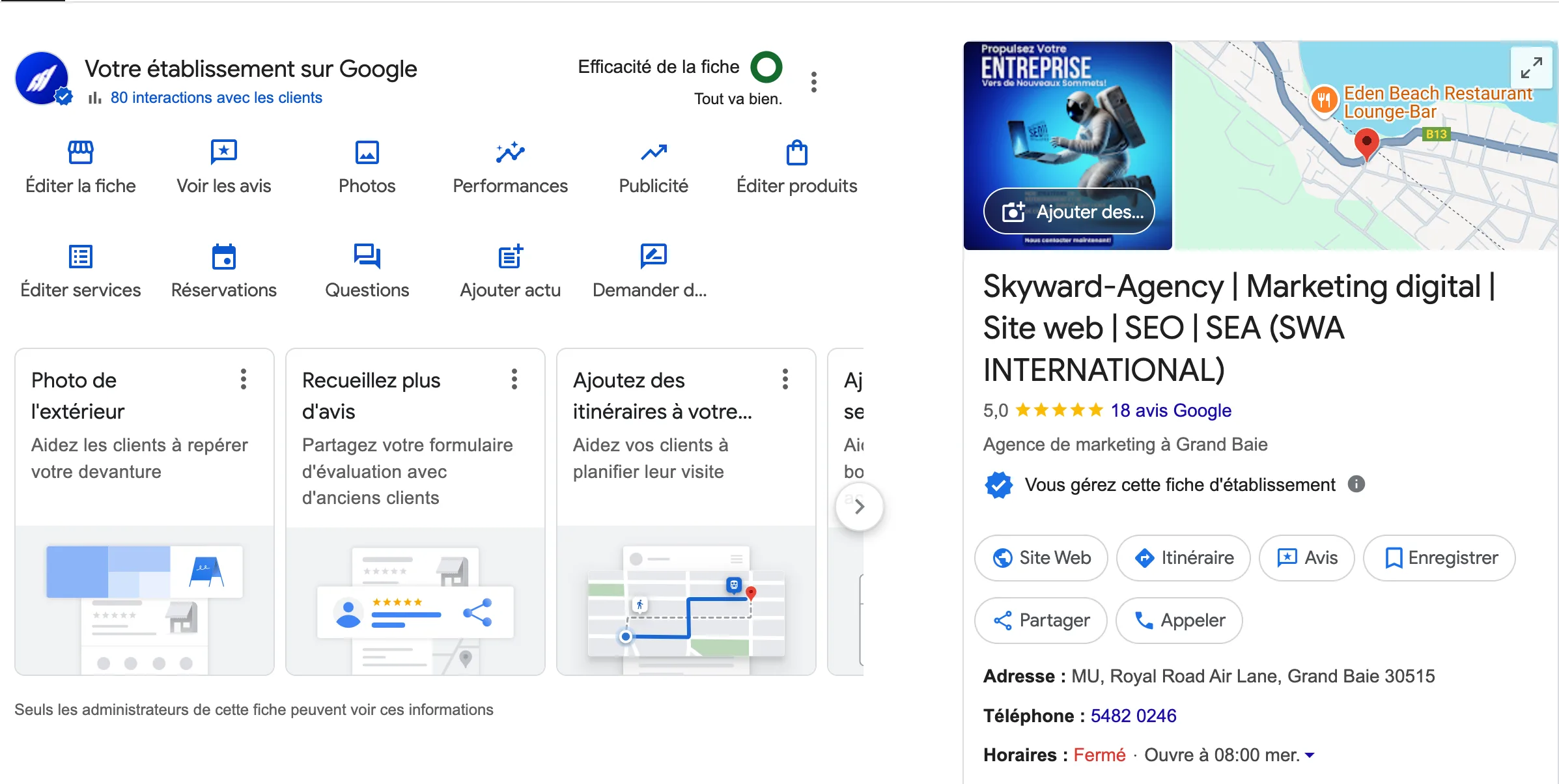
3- Google My Business, Bing Places and Local SEO: Essential Tools to Attract More Customers
Google My Business and Bing Places are powerful levers to boost local visibility and convert more prospects.
✅ Why is it essential?
- 46% of Google searches have a local intent.
- A well-optimised listing improves your local SEO and brings in qualified leads.
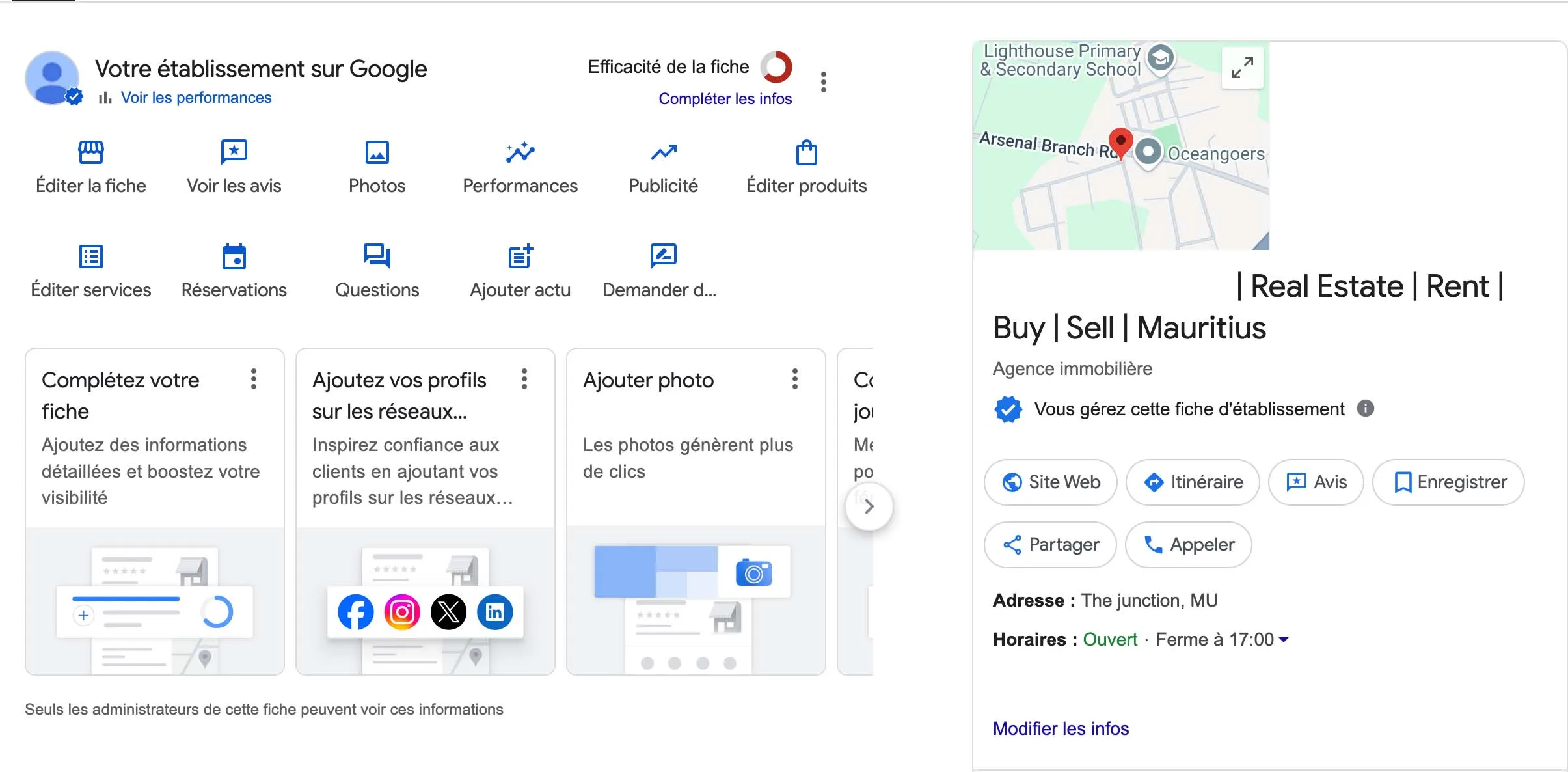
👇 Example below of a well-optimised listing 👇
👇 Versus a poorly optimised listing 👇
4- Social Media and Conversions: An Underused Lever
Social media doesn’t just serve to build a community, it also drives qualified traffic to your website.
🎯 Example strategies to apply:
- Create engaging content (interactive posts, explainer videos, customer testimonials).
- Use targeted advertising on Facebook and Instagram to redirect to conversion pages (using Meta Ads Manager).
- Integrate social sharing buttons on your website to amplify reach (Instagram, Facebook, TikTok, X, YouTube icons).
AI SEO and Organic Search: How to Leverage It to Improve Conversion?
Artificial intelligence is revolutionising SEO with automatic content optimisation and advanced trend analysis.
✅ Tools to use:
- SurferSEO and Frase.io for content optimisation. (If you’re an agency, you can use tools like SemRush or SeRanking to optimise your SEO and local SEO.)
- ChatGPT to generate blog ideas. Be careful not to create content made entirely by AI. AI can be a great tool to optimise your content, but it can also work against you.
Conclusion
A WordPress website, Shopify, or one built in HTML, regardless of the platform, relies on a combination of UX optimisation, SEO, Google My Business and social media. To boost your conversion rate, it’s essential to:
- Optimise the user experience with a clean design and fast loading times.
- Implement an effective SEO strategy with targeted keywords and relevant content.
- Leverage Google My Business and social media to maximise your local visibility.
🚀 Take action! Analyse your site, apply these tips and measure the evolution of your conversion rate using Google Analytics and Search Console.
F.A.Q
Answers to essential questions to improve your website’s conversion and visibility
👉 How do I know if my website has a conversion problem?
If your site attracts visitors but nobody takes action (purchase, contact request, sign-up), that’s a warning sign. Look at your bounce rate (how many visitors leave your site without interacting), your average time on page, and above all, the number of clicks on your call-to-action (CTA) buttons.💡 Tip: Test your site as if you were a customer! Is the information clear? Can you easily find where to click?
📌 Recommended tool: Google Analytics to analyse visitor behaviour.
👉 My site gets traffic, but I receive no contact requests, why?
Getting traffic is good. But if nobody contacts you, it’s often because:🔹 Your main message (what you offer) isn’t clear within the first seconds.
🔹 Your CTAs (action buttons) are poorly placed or unconvincing.
🔹 Your contact form is too long or complicated.
🔹 Your site doesn’t build enough trust (lack of customer reviews, trust elements like certifications, a physical address, etc.).
💡 Quick fix: Try displaying an ultra-clear message from the moment visitors arrive on your site, such as:
“Need a high-performing website? Contact us in 1 click” ✅
📌 Action to test: Place a “Request a free quote” button prominently at the top of each page.
👉 Do pop-ups and chatbots really improve conversion?
Yes, but only if used correctly! A pop-up that appears the moment you land on the site and blocks navigation? That’s a no. 🚫A smart pop-up that appears when the user is about to leave the page, offering them an interesting deal? That works! ✅
Similarly, a well-programmed chatbot can guide your visitors, answer frequently asked questions and prevent them from leaving frustrated.
💡 Best practices:
Pop-ups → Only display them after a few seconds or before exit.
Chatbots → Use them to answer common questions or offer quick human contact.
📌 Concrete example: An online store that displays a pop-up with “5% discount if you order in the next 10 minutes” can see its conversion rate double. 🎯
👉 Why doesn’t my website show up on Google despite my SEO efforts?
If you’ve optimised your site but it remains invisible on Google, several reasons may explain it:🔹 Too much competition → Your site may be drowned among industry giants. Try targeting long-tail keywords (example: instead of “SEO agency”, aim for “WordPress SEO agency in Paris”).
🔹 Poor internal linking → Google loves well-organised sites. Add links between your pages to better structure the information.
🔹 Technical issues → Your site may be too slow, poorly indexed or contain errors preventing Google from properly crawling it.
💡 Quick action: Type “site:yourdomain.com” on Google. If you don’t see your main pages, there’s an indexing problem!
📌 Recommended tool: Google Search Console to see if Google is encountering difficulties with your site, and Bing Webmaster Tools to do the same on Bing. .cta-container { background: linear-gradient(135deg, #0234d3, #010569); color: white; text-align: center; padding: 30px; border-radius: 10px; margin-top: 40px; box-shadow: 0 4px 10px rgba(0, 0, 0, 0.2); } .cta-container h2 { font-size: 24px; margin-bottom: 10px; color: white; } .cta-container p { font-size: 18px; margin-bottom: 20px; } .cta-button { display: inline-block; background: white; color: #000; padding: 12px 25px; font-size: 18px; font-weight: bold; text-decoration: none; border-radius: 5px; transition: 0.3s; } .cta-button:hover { background: #010569; color: #fff; }
Need high-performing SEO?
Contact us now and get a free quote!
Request a quote